 1 / 10
Epson · Skeneri
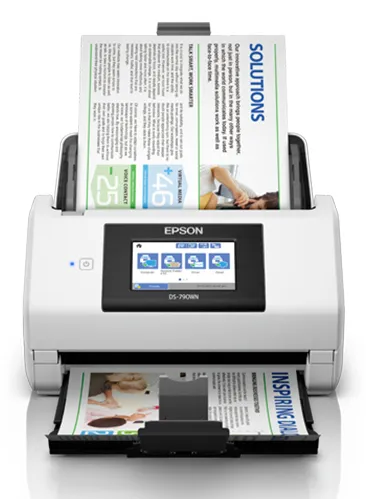
Epson WorkForce DS-790WN
Epson WorkForce DS-790WN, 215.9 x 6096 mm, 600 x 600 DPI, 30 bit, 24 bit, 10 bit, 8 bit
Operating temperature (T-T): 5 - 35 °CEthernet LAN: YesStorage relative humidity (H-H): 15 - 85%Height: 217 mmInput voltage: 100 - 240 VWidth: 296 mm
Specifikacije
- Operating temperature (T-T)
- 5 - 35 °C
- Ethernet LAN
- Yes
- Storage relative humidity (H-H)
- 15 - 85%
- Height
- 217 mm
- Input voltage
- 100 - 240 V
Opis
The new and compact Epson WorkForce DS-790WN delivers a higher level of efficiency and versatility to boost productivity while improving environmental sustainability. Impressive speeds and built-in Ethernet connectivity allows you to easily share your files through "Scan to" functions on a 4.3” LCD Touchscreen panel with customised setting. Make your performance count in both your business world as well as our world.
Fast and Compact Scanning
Measuring 296 x 169x 167mm (W x D x H), the DS-790WN is a powerhouse that does not take up space and can be placed virtually anywhere in the office. Small but mighty, its solid performance can scan speeds of up to 45ppm/90ipm, bringing your productivity to greater heights. In addition, documents can be digitised for a more sustainable business.
Efficient Scanning
Built-in Ethernet
With built-in Ethernet and Wi-Fi connectivity, the DS-790WN can be conveniently shared in a multi-user environment. It also acts as an access point, enabling up to 8 Wi-Fi devices to be connected directly.
Automatic Document Feeder (ADF)
The DS-790WN is equipped with a 100-sheet ADF for convenient scanning of documents.
ScanWay - Easy and fuss-free data sharing
ScanWay supports network sharing functions, as well as stand-alone operation without needing to connect to a PC. Epson's ScanWay models provide simple, reliable, and secure scanning solutions for scanner operators and administrators.
With DS-790WN:
- Scan documents straight to Cloud, Network folders, E-mail and USB.
- Facilitate scan workflow directly from the 10.9cm colour touchscreen. Make individual jobs easy to identify with panel customisation.
- Use User Authentication to optimise security when multiple users share the same scanner.
Secure Document Management
Manage scan jobs efficiently and securely with the document management software and Card Authentication Function.
Document Capture Pro
Easily scan, edit, and process documents or integrate them into cloud services. Documents can be converted into searchable PDF files or editable Office documents with built-in OCR capability. User can select up to 10 areas each by OCR or OBR, and export a data file for further processing.
Document Capture Pro Server
Document Capture Pro Server helps to centralise your scanning and manage your fleet of scanners without the need to install drivers on individual computers, and with no compromise on document security.
Serverless Authentication for Scanner
Secure the use of the scanner without a server. Up to 50 users can be registered on the device, and documents distributed securely by a user list. Usage reports and scan logs can be generated using Epson Device Admin.
Epson Smart Panel
Scanner can be connected to Wi-Fi and scanned directly to mobile devices with Epson Smart Panel. This app also provides guides to troubleshoot issues.
Mixed media scanning & Long Document Support
Scan a variety of media from paper documents to plastic cards such as ID, credit and business cards efficiently and seamlessly. The DS-790WN is capable of scanning huge volumes of paper weighing 27 gsm to 413 gsm and long documents up to 6,096mm.
Driverless Scanning
Scan directly to Chromebooks and android devices with support from Mopria. Mac users can also scan without drivers using Apple AirPrint technology.
Scan Fragile and A3 Documents Easily
Scan small and fragile documents, up to A3-sized documents, using a carrier sheet that can be automatically detected by the DS-790WN. Alternatively, you may scan fragile documents without using a carrier sheet by turning on the Slow Scan Mode.
User-friendly Features
Automatic Feeding Mode
The Automatic Feeding Mode enables large volumes of documents to be scanned continuously. In addition, this mode allows you to scan documents one at a time without needing to arrange them by size and they will be saved into a single PDF.
Double Feed Detection Skip Function
Activate the Double Feed Detection Skip function to scan documents with stickers and labels.
Fleet Management with Epson Device Admin
With Epson Device Admin, you can now manage, monitor and configure your Epson device fleet effortlessly. It is compatible with a large range of networked printers and scanners, and all information can be viewed via one smart, intuitive interface.
Fast and Compact Scanning
Measuring 296 x 169x 167mm (W x D x H), the DS-790WN is a powerhouse that does not take up space and can be placed virtually anywhere in the office. Small but mighty, its solid performance can scan speeds of up to 45ppm/90ipm, bringing your productivity to greater heights. In addition, documents can be digitised for a more sustainable business.
Efficient Scanning
Built-in Ethernet
With built-in Ethernet and Wi-Fi connectivity, the DS-790WN can be conveniently shared in a multi-user environment. It also acts as an access point, enabling up to 8 Wi-Fi devices to be connected directly.
Automatic Document Feeder (ADF)
The DS-790WN is equipped with a 100-sheet ADF for convenient scanning of documents.
ScanWay - Easy and fuss-free data sharing
ScanWay supports network sharing functions, as well as stand-alone operation without needing to connect to a PC. Epson's ScanWay models provide simple, reliable, and secure scanning solutions for scanner operators and administrators.
With DS-790WN:
- Scan documents straight to Cloud, Network folders, E-mail and USB.
- Facilitate scan workflow directly from the 10.9cm colour touchscreen. Make individual jobs easy to identify with panel customisation.
- Use User Authentication to optimise security when multiple users share the same scanner.
Secure Document Management
Manage scan jobs efficiently and securely with the document management software and Card Authentication Function.
Document Capture Pro
Easily scan, edit, and process documents or integrate them into cloud services. Documents can be converted into searchable PDF files or editable Office documents with built-in OCR capability. User can select up to 10 areas each by OCR or OBR, and export a data file for further processing.
Document Capture Pro Server
Document Capture Pro Server helps to centralise your scanning and manage your fleet of scanners without the need to install drivers on individual computers, and with no compromise on document security.
Serverless Authentication for Scanner
Secure the use of the scanner without a server. Up to 50 users can be registered on the device, and documents distributed securely by a user list. Usage reports and scan logs can be generated using Epson Device Admin.
Epson Smart Panel
Scanner can be connected to Wi-Fi and scanned directly to mobile devices with Epson Smart Panel. This app also provides guides to troubleshoot issues.
Mixed media scanning & Long Document Support
Scan a variety of media from paper documents to plastic cards such as ID, credit and business cards efficiently and seamlessly. The DS-790WN is capable of scanning huge volumes of paper weighing 27 gsm to 413 gsm and long documents up to 6,096mm.
Driverless Scanning
Scan directly to Chromebooks and android devices with support from Mopria. Mac users can also scan without drivers using Apple AirPrint technology.
Scan Fragile and A3 Documents Easily
Scan small and fragile documents, up to A3-sized documents, using a carrier sheet that can be automatically detected by the DS-790WN. Alternatively, you may scan fragile documents without using a carrier sheet by turning on the Slow Scan Mode.
User-friendly Features
Automatic Feeding Mode
The Automatic Feeding Mode enables large volumes of documents to be scanned continuously. In addition, this mode allows you to scan documents one at a time without needing to arrange them by size and they will be saved into a single PDF.
Double Feed Detection Skip Function
Activate the Double Feed Detection Skip function to scan documents with stickers and labels.
Fleet Management with Epson Device Admin
With Epson Device Admin, you can now manage, monitor and configure your Epson device fleet effortlessly. It is compatible with a large range of networked printers and scanners, and all information can be viewed via one smart, intuitive interface.
Kretanje cena
Aktivni oglasi
Trenutno nema oglasa
Postavi oglas i budi prvi prodavac za ovaj model.